Virtual Plastic Surgery Software 1.0 [Portable]

.

The VPSS is a simple to use, yet powerful photo warping software that will let you modify photos to simulate virtual plastic surgery results on anyone's face and body.


As a specific purpose software,we developed a custom and convenient interface more suited for virtual plastic surgery simulation than anything you will find on general purpose, thousand dollars traditional software suits.Our software is popular among plastic surgeons who want to discuss surgery outcome with their patients, plastic surgery candidates who want to "preview" the potential results of an aesthetic surgery , social network participants who want to improve their appearance, and people who want to have fun warping photos of faces, bodies, celebrities and pets in a caricaturist fashion.

Features:

Photo realistic warping tools:
The VPSS tools will let you perform all kind of virtual plastic surgeries on your own photos. Tools
can be used in combination, which means you can grow and drag a same surface for example.

Reconstruct tool:
This tool will progressively revert the selected image portion to its original state.This tool can be
handy to revert only a part of an image to its original state, so you can keep your modifications on the rest of an image.

Undo, reset
We placed easily accessible full reset and last action undo icons on the software interface, to rapidly cancel your actions.

Tabbed interface:
The tabbed interface allows you to easily switch between original image, modified image, or a combination of both. Zoom and scrolling are synchronized between before and after tabs, and between the combined views.

Drawings and text
The VPSS allows you to draw on your images: free forms, straight lines, filled or empty geometric shapes and texts.

Webcam support
If you have a webcam installed on your computer, it will be recognized by the VPSS, and you will be able to capture image from your webcam right into the VPSS.

Smart image saving
When you decide to save your work, the VPSS will create a folder containing: the original image, the modified image, and a combination of both. You are able to keep original image size, or define your own size while saving. Here is the content of the saved folder. Click on the images to see real size versions. Notice how the result is realistic and smooth.

Watermark Support
Watermarks are text that will appear over your saved combined image. There are 3 watermark zones : Top left corner (default is text "Before"), Top right corner (default is text "After"), and middle bottom (default is empty). You can put any short text you want in the watermarks setting fields.

DOWNLOAD:
http://rapidshare.com/files/133842540/P.Virtual.Plastic.SurgeryS.v1.0-ColombianWarez.Com.rar

Related Link :

Read More »»

Retouch Pilot 3.0.1 [portable] - 3.2 MB

.

"Photo retouching software for imperfections and unwanted objects removal." Retouch Pilot is photo retouching software specially designed for imperfections removal from a photo.The program removes small technical imperfections present on an image or having appeared while scanning a photo such as scratches, spots from dust particles and hair. With this program you'llbe able to restore scanned old photos. Also the Retouch Pilot allows you to quite easily retouch some unwanted objects from a digital photo.

Old photo restoration

With this program you'll be able to restore scanned old photos. Retouch Pilot allows you to remove any defects arising from long-term storage of a still picture: fixer stains, scratches and worn spots.

Download :
http://rapidshare.com/files/125425767/Retouch_Pilot_3.0.1_Portable.rar

Related Links :

Read More »»

Portrait Professional Max 6.3.5 [Portable] - 11 MB

.

Portrait Professional is new intelligent portrait airbrushing software that has been 'trained' in human beauty. It lets you improve your photos instantly, just by moving sliders.


With Portrait Professional, it's incredibly easy and fast to:

*Subtly reshape all or any aspect of the face to make it more attractive
*Fix skin blemishes such as spots or pimples
*Reduce and/or remove wrinkles
*Remove grease, sweat or unsightly shine highlights from the skin
*Adjust the lighting on the face to make it more flattering
*Remove red eye
*Whiten teeth and eyes

How does the automatic touch-up work?
Portrait Professional has been shown hundreds of photographs of beautiful human faces, and using sophisticated statistical techniques, it has learnt how to subtly airbrush and touch-up photographs to make them more beautiful.

All you have to do is choose how much to enhance the lighting, the skin texture and even how many wrinkles to remove. You can even subtly re-sculpt the face to make your subject look as good as possible by just moving a few sliders.

Portrait Professional touches up and enhances people in the same way that good lighting and perfect makeup is used to make someone look more attractive. The software really can make anyone look as good as a celebrity in a magazine.

Max option

For users that prefer to do their photo enhancement directly with RAW files and 16 bits per color TIFF files we offer the Max option.
The Max option enables Portrait Professional to work directly with 16 bits per color tiffs and RAW files straight from the camera.
The Max option means you can maintain the highest possible quality image editing throughout the production process without having to resort to any other program.

Download :
http://rapidshare.com/files/127949135/Portable_Portrait_Professional_Max_6.3.5.rar

Related Link :

Read More »»

Picasa V.2.7 (Portable)

.

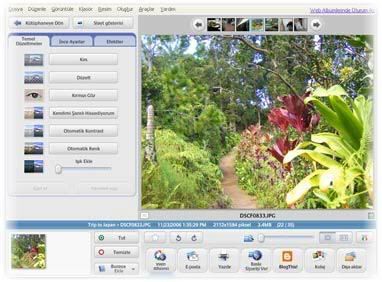
Image Picasa is software that helps you instantly find, edit and share all the pictures on your PC. Every time you open Picasa, it automatically locates all your pictures (even ones you forgot you had) and sorts them into visual albums organized by date with folder names you will recognize. You can drag and drop to arrange your albums and make labels to create new groups. Picasa makes sure your pictures are always organized.


Picasa also makes advanced editing simple by putting one-click fixes and powerful effects at your fingertips. And Picasa makes it a snap to share your pictures; you can email, print photos at home, make gift CDs, instantly share via Hello;, and even post pictures on your own blog.

Download at:
http://rapidshare.com/files/105541546/fedestudio_linkwizards.us_Picasa_Portable.rar

Related Links :

Read More »»

Google Earth v4.3.7 Final [Portable ] - 8 MB

.

Google Earth lets you fly anywhere on Earth to view satellite imagery, maps, terrain, 3D buildings and even explore galaxies in the Sky. You can explore rich geographical content, save your toured places and share with others.


Google Earth puts a planet's worth of imagery and other geographic information right on your desktop. View exotic locales like Maui and Paris, as well as points of interest such as local restaurants, hospitals, and schools. Google Earth combines satellite imagery, maps, and the power of Google Search to put the world's geographic information at your fingertips. With Google Earth you can fly from space to your neighborhood--just type in an address and zoom right in, search for schools, parks, restaurants, and hotels. Get driving directions, tilt and rotate the view to see 3D terrain and buildings, save and share your searches and favorites and even add your own annotations.

Version 4.3 adds day and night lighting, Street View, more 3D models, and faster rendering speeds.

Note: Google Earth is a broadband, 3D application that not all computers can run. Windows-based desktop PCs older than four years may not be able to run Google Earth and Windows-based notebook PCs older than two years may not be able to run it.

The latest version of Google Earth continues to set the mapping paradigm. Accessible enough for casual users, Google has been added features that make it a necessity for those whose topographic desires are more serious.

Most of the interface's real estate displays a rendering of the globe, which slowly zooms in on a satellite image of your destination once you've keyed it in. The control panel has changed again, but the real draw is the addition of Street View, an on-the-ground 360-degree look at the premises that users may recognize from Google Maps. Also gracing the virtual globe is an option to illuminate it in real-time.

Everything from roads and restaurants to crime statistics can be displayed; subcategories and individual items can be unchecked to show only what you need. Google's driving directions are incorporated, and the user community has produced several nifty mods, including historical maps. There's also integration with Google's 3D rendering program SketchUp, which you can use to place buildings and other ornamentation in a real-life setting.

The only downside to the program is that it can consume a large amount of RAM, so as the developer notes, older machines might experience performance issues. But everyone else is bound to love Google Earth, both as an entertaining novelty and an informational tool.

Download :
http://rapidshare.com/files/127059496/Portable_Google_Earth_v4.3_smforum.net..rar

Related Links :

Read More »»